

I recently got very interested in Internet marketing and one day my friend Ruslan Abuzant suggested that I register at one of the largest Internet marketing forum – Digital Point Forum (DPF).
Later the same day he said that there was this special cool feature that displayed the current music (current track) you were listening to. He said that WinAmp was not supported and it would be a pretty interesting thing to write for DPF. So I got the Winamp SDK, played with examples a little and after a few days had the plugin running. At first I thought I'd sell a copy for $5 each but now I decided to give it away for free and even opensource it under GNU GPL license.
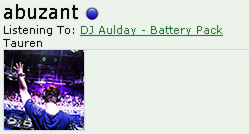
Here is how the current track that a user listens to is displayed on DPF. Notice the Listening to label.
How to install the plugin?
First, download the plugin: catonmat.net/ftp/gen_digitalpoint.dll.
It's a DLL file called "gen_digitalpoint.dll". ("Gen" stands for "general purpose plugin.")
Next, put the plugin in C:\Program Files\Winamp\Plugins directory.
Next, restart Winamp and navigate to general purpose plugin preferences. Take these steps to get to the preferences:
- Step 1: Right click on Winamp.
- Step 2: Select Options -> Preferences.
- Step 3: Find Plug-ins section.
- Step 4: Click on General Purpose label.
See this screenshot if you're getting lost, it's after step 2:
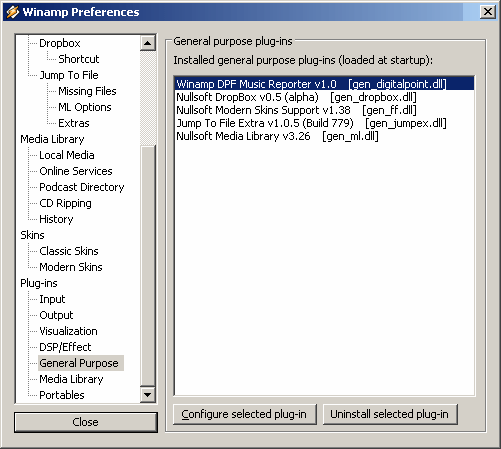
You will see all the installed general purpose plugins. Notice your new plugin Winamp DPF Music Reporter v1.0. Now double click it. The configuration dialog will appear:
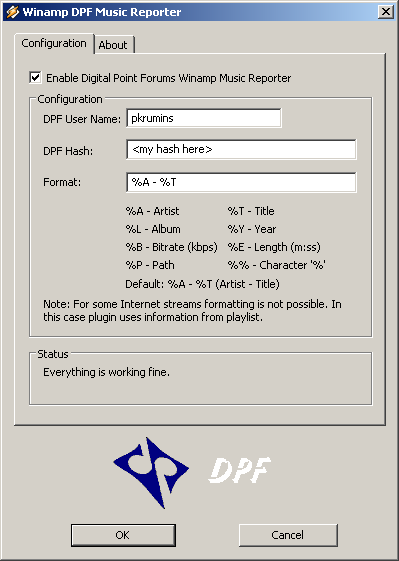
Enter your DPF username and the special authentication hash that can be found in your Edit Profile link on DPF.
You can also specify the track display format. The default format is "%A - %T" which stands for "Artist - Track".
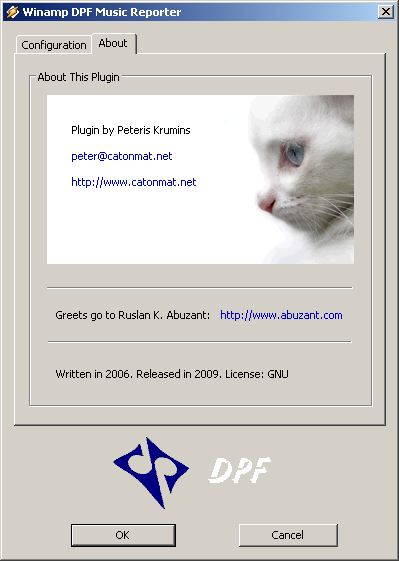
Here is how the About screen looks like:
DPF Winamp Music Reporter Source Code
If you want to compile the plugin from source yourself, get the whole source tree as a zip file here:
The details about how to compile it are in the compile.txt file in the source tree.
Have fun and see you next time!