
 When I was a kid I liked RAD (Rapid Application Development) in Microsoft® Visual Basic® programming language. I mastered the language entirely from MSDN's samples and it was such a joy to create GUI applications in a few hours or days and they just worked. Now it has been a couple of years since I last touched Visual Basic and I've become really rusty in this language.
If you've been reading my blog, you'll have noticed that I've been creating these YouTube video downloaders in various programming languages. I have no plans to create a downloader in Visual Basic itself, because I am creating a GUI downloader in C and C++ already but I'd like to use VBScript, which is a subset of Visual Basic language to create the downloader.
That would refresh my knowledge of Visual Basic a little bit and also let me learn a little more about programming Windows Script Host (WSH).
Here is a quote from a really good introduction to what WSH is:
The first time people encounter Windows Script Host, they often express some confusion. What exactly is WSH? Is it a language, like VBScript or JScript? No; although WSH enables you to run programs written in these languages, it is not a language itself. WSH is a script host. A script host is a program that provides an environment in which users can execute scripts in a variety of languages, languages that use a variety of object models to perform tasks. You are probably already familiar with other script hosts. Microsoft Internet Explorer, for example, enables users to execute scripts that use the Dynamic HTML object model. Shell programs (such as C Shell, Bourne Shell and Korn Shell) enable you to write scripts that use an object model capable of manipulating the file system. Even the command prompt can be thought of as a scripting environment because it can run scripts written in the "batch file" language. WSH is an unusual script host in that it was designed to be general-purpose. Unlike most of the scripting tools mentioned above, WSH imposes restrictions on neither the language used to write scripts nor the object models used by scripts.
WSH is ideal for non-interactive scripting needs such as logon scripting and administrative scripting but we will use it to download YouTube videos as well.
The key advantage of this script is that it will run on any Windows operating system newer than Windows 98. If you have Windows 98 or an older Windows, follow this link and install the latest version of WSH.
Let's define the interface of the script.
The script can either be run in WScript environment or CScript environment. WScript is the system default on Windows 2000. Characteristics of this environment are that output appears in a pop-up window, and script execution waits until the user clears the pop-up window by pressing OK button. The other environment is the CScript environment. The primary difference between the CScript and WScript environments is that the CScript environment directs display information to the command window, which has a side effect of letting a script run to completion without pausing for each message sent to the UI. I want this script to be usable from both of the environments.
Here is what I am thinking. By default I want this script to be accepting the video URL to download as the first command line argument (followed by more videos as next arguments). If the first argument is not provided and it is run in WScript environment I want the script to pop up an InputBox dialog asking for the URL of the video to download. Otherwise, if it is run in CScript environment, I want it to quit.
How do we find in which environment the script is being run? I had no idea, so I turned to Google Groups and searched for "cscript wscript detect" and found this post which explained how to do it with this snippet of code:
If "CSCRIPT.EXE" = UCase(Right(WScript.Fullname, 11)) Then
    WScript.Echo "The program was run by CScript!"
End If
The next thing we need to figure out is how to get the command line arguments of a running script.
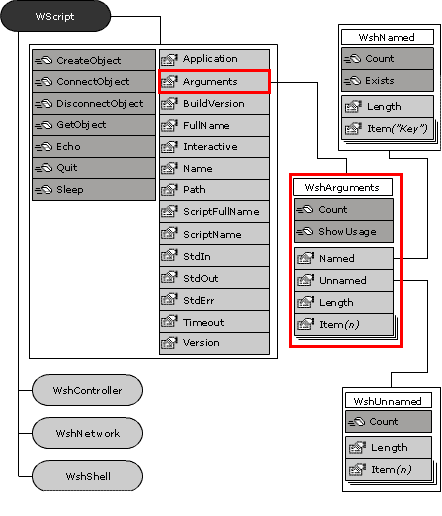
Turns out that each WSH script has a WScript object available without the script needing to bind to the object. Command-line arguments are stored in the WshArguments collection, which you access through the Arguments property of the WScript object.
Here is a diagram of WScript object's methods, properties and WShArguments expanded:
The easiest way to loop over all arguments is shown in this snippet:
Set objArgs = WScript.Arguments
For I = 0 to objArgs.Count - 1
   WScript.Echo objArgs(I)
Next
Now just instead of "WScript.Echo objArgs(I)" we call "DownloadVideo objArgs(I)", where DownloadVideo is our procedure for downloading YouTube videos.
In one of the previous articles, downloading youtube videos with awk programming language, I explained how the embedded YouTube flash video player retrieves the video file itself. Please see that article if you are interested in how I figured it out.
Last two things we have to figure out before we have a running script is how to talk over HTTP with VBScript and how to save the incoming binary data to a file.
Both VBScript and WScript object provide CreateObject function (but there is a difference between them) which allows binding to COM objects.
There is a "Microsoft.XmlHttp" COM Object which is shipped with Internet Explorer 5.0 and later. This object is what actually provides the well known AJAX interface used in Web2.0 applications - the XMLHttpRequest interface. Here at MSDN is the documentation of this interface with all the methods and properties it provides.
When we get the video, we will be dealing with binary data. Microsoft Scripting Runtime provides us with FileSystemObject (FSO) but unfortunately it is not suitable for writing binary files.
There is a way to write binary files with FSO but it is so slow that I dropped this solution. It took more than 10 minutes to write 1MB of data!
' Given a FileName and Data, saves Data to file named FileName
Sub SaveData(FileName, Data)
    Dim Fso: Set Fso = CreateObject("Scripting.FileSystemObject")
    Dim TextStream: Set TextStream = Fso.CreateTextFile(FileName, True)

    WScript.Echo LenB(Data)
    TextStream.Write BinaryToString(Data)
End Sub

' Given Binary data, converts it to a string
Function BinaryToString(Binary)
  Dim I, S
  For I = 1 To LenB(Binary)
    S = S & Chr(AscB(MidB(Binary, I, 1)))
  Next
  BinaryToString = S
End Function
A much better way to write binary data to a file with VBScript is using ADODO.Stream Object which deals with binary data out of the box. Look at SaveVideo function in my final program to see how it is used to write binary data to file.
Script Usage
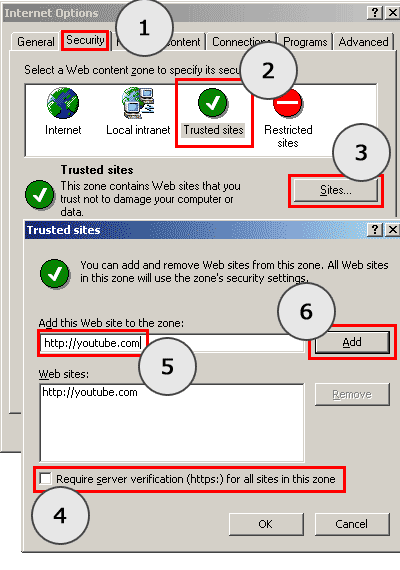
Before the script can be used, you have to tell your computer to trust youtube.com domain. If you do not do this, executing the script will lead you to the following error:
ytdown.vbs(73, 5) msxml3.dll: Access is denied.
Youtube.com domain can be trusted by adding it to trusted sites security zone in Internet Explorer.
Launch your Internet Explorer browser and head to Tools -> Internet Options, then follow the steps illustrated in this image:
Once you have trusted youtube.com domain, you can start downloading the videos.
One of the ways is to double click the ytdown.vbs icon which will launch the script in WScript environment and an input dialog will appear asking for a video to download:
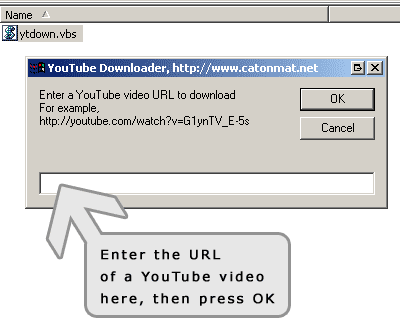
After you press "OK", the downloader will save the video to a file with the title of the video and .flv extension in the same directory!
The other way to download a video is to call it via command line in CScript environment:
C:\ytdown>cscript ytdown.vbs "http://www.youtube.com/watch?v=h9MN2mKGZoo"
Microsoft (R) Windows Script Host Version 5.6
Copyright (C) Microsoft Corporation 1996-2001. All rights reserved.

Downloading video '30 fps, 30 frames (1 second)'
Done!
Happy downloading!
The downloaded .flv file can be converted to a better format like DivX or .avi.
Read about converting a video to a better format in this article.
Here is the final script:
'
' Peteris Krumins (peter@catonmat.net, @pkrumins on twitter)
' www.catonmat.net -- good coders code, great coders reuse
'
' Version v1.15
'

Option Explicit

Dim WscriptMode

' Detect if we are running in WScript or CScript
If UCase(Right(WScript.Fullname, 11)) = "WSCRIPT.EXE" Then
    WScriptMode = True
Else
    WScriptMode = False
End If

Dim Args: Set Args = WScript.Arguments

If Args.Count = 0 And WScriptMode Then
    ' If running in WScript and no command line args are provided
    ' ask the user for a URL to the YouTube video
    Dim Url: Url = InputBox("Enter a YouTube video URL to download" & vbCrLf & _
                   "For example, http://youtube.com/watch?v=G1ynTV_E-5s", _
                   "YouTube Downloader, https://catonmat.net")
    If Len(Url) = 0 Then: WScript.Quit 1
    DownloadVideo Url
ElseIf Args.Count = 0 And Not WScriptMode Then
    ' If running in CScript and no command line args are provided
    ' show the usage and quit
    WScript.Echo "Usage: " & WScript.ScriptName & " <video url 1> [video url 2] ..."
    WScript.Quit 1
Else
    ' Download all videos
    Dim I

    For I = 0 to args.Count - 1
        DownloadVideo args(I)
    Next
End If

' Downloads a YouTube video and saves it to a file
Sub DownloadVideo(Url)
    Dim Http, VideoTitle, VideoName, Req

    Set Http = CreateObject("Microsoft.XmlHttp")
    Http.open "GET", Url, False
    Http.send

    If Http.status <> 200 Then
        WScript.Echo "Failed getting video page at: " & Url & vbCrLf & _
                     "Error: " & Http.statusText
        Exit Sub
    End If

    Dim VideoId: VideoId = ExtractMatch(Url, "v=([A-Za-z0-9-_]+)")
    If Len(VideoID) = 0 Then
        WScript.Echo "Could not extract video ID from " & Url
        Exit Sub
    End If

    VideoTitle = GetVideoTitle(Http.responseText)
    If Len(VideoTitle) = 0 Then
        WScript.Echo "Failed extracting video title from video at URL: " & Url & vbCrLf & _
                     "Will use the video ID '" & VideoID & "' for the filename."
        VideoName = VideoID
    Else
        VideoName = VideoTitle
    End If

    Dim FmtMap: FmtMap = GetFmtMap(Http.responseText)
    If Len(FmtMap) = 0 Then
        WScript.Echo "Could not extract fmt_url_map from the video page."
        Exit Sub
    End If

    Dim VideoURL: VideoURL = Find_Video_5(FmtMap)
    If Len(VideoURL) = 0 Then
        WScript.Echo "Could not extract fmt_url_map from the video page."
        Exit Sub
    End If

    If WScriptMode = False Then: WScript.Echo "Downloading video '" & VideoName & "'"
    Http.open "GET", VideoURL, False
    Http.send

    If Http.status <> 200 Then
        WScript.Echo "Failed getting the flv video: " & Url & vbCrLf & _
                     "Error: " & Http.statusText
        Exit Sub
    End If

    Dim SaneFilename
    SaneFilename = MkFileName(VideoName)

    SaveVideo SaneFilename, Http.ResponseBody
    WScript.Echo "Done downloading video. Saved to " & SaneFilename & "."
End Sub

' Given fmt_url_map, url-escapes it, and finds the video url for video
' with id 5, which is the regular quality flv video.
Function Find_Video_5(FmtMap)
    FmtMap = Unescape(FmtMap)
    Find_Video_5 = ExtractMatch(FmtMap, ",?5\|([^,]+)")
End Function

' Given YouTube Html page, extract the fmt_url_map parameter that contains
' the URL to the .flv video
Function GetFmtMap(Html)
    GetFmtMap = ExtractMatch(Html, """fmt_url_map"": ""([^""]+)""")
End Function

' Given YouTube Html page, the function extracts the title from <title> tag
Function GetVideoTitle(Html)
    ' get rid of all tabs
    Html = Replace(Html, Chr(9), "")

    ' get rid of all newlines (vbscript regex engine doesn't like them)
    Html = Replace(Html, vbCrLf, "")
    Html = Replace(Html, vbLf, "")
    Html = Replace(Html, vbCr, "")

    GetVideoTitle = ExtractMatch(Html, "<title>YouTube ?- ?([^<]+)<")
End Function

' Given the Title of a video, function creates a usable filename for a video by
' sanitizing it - stripping parenthesis, changing non alphanumeric characters
' to _ and adding .flv extension
Function MkFileName(Title)
    Title = Replace(Title, "(", "")
    Title = Replace(Title, ")", "")

    Dim Regex
    Set Regex = New RegExp
    With Regex
        .Pattern = "[^A-Za-z0-9-_]"
        .Global = True
    End With

    Title = Regex.Replace(Title, "_")
    MkFileName = Title & ".flv"
End Function

' Given Text and a regular expression Pattern, the function extracts
' the first submatch
Function ExtractMatch(Text, Pattern)
    Dim Regex, Matches

    Set Regex = New RegExp
    Regex.Pattern = Pattern

    Set Matches = Regex.Execute(Text)
    If Matches.Count = 0 Then
        ExtractMatch = ""
        Exit Function
    End If

    ExtractMatch = Matches(0).SubMatches(0)
End Function

' Function saves Data to FileName
Function SaveVideo(FileName, Data)
  Const adTypeBinary = 1
  Const adSaveCreateOverWrite = 2

  Dim Stream: Set Stream = CreateObject("ADODB.Stream")

  Stream.Type = adTypeBinary
  Stream.Open
  Stream.Write Data
  Stream.SaveToFile FileName, adSaveCreateOverWrite
End Function

'
' ==========================================================================
' The following code saves binary data to file using FileSystemObject
' It is so slow that even on a 3.2Ghz computer saving 1 MB takes 10 minutes!
' Don't use it! I put it here just to illustrate the wrong solution!
' ==========================================================================
'

' Given a Filename and Data, the function saves Data to File
'Sub SaveVideo(File, Data)
'    Dim Fso: Set Fso = CreateObject("Scripting.FileSystemObject")
'    Dim TextStream: Set TextStream = Fso.CreateTextFile(File, True)
'
'    WScript.Echo LenB(Data)
'    TextStream.Write BinaryToString(Data)
'End Sub

' Given Binary data, converts it to a string
'Function BinaryToString(Binary)
'  Dim I, S
'  For I = 1 To LenB(Binary)
'    S = S & Chr(AscB(MidB(Binary, I, 1)))
'  Next
'  BinaryToString = S
'End Function

'
' ==========================================================================
' The following is an implementation of UrlUnescape. It turned out VBScript
' has Unescape() function built in already, that does it!
'
'Function UrlUnescape(Str)
'    Dim Regex, Match, Matches
'
'    Set Regex = New RegExp
'    With Regex
'        .Pattern = "%([0-9a-f][0-9a-f])"
'        .IgnoreCase = True
'        .Global = True
'    End With
'    ' Wanted to do this, but it wasn't quite possible
'    ' UrlUnescape = Regex.Replace(Str, Chr(CInt("&H" & $0)))
'
'    Set Matches = Regex.Execute(Str)
'    For Each Match in Matches
'        Str = Replace(Str, Match, Chr(CInt("&H" & Match.SubMatches(0))))
'    Next
'
'    UrlUnescape = Str
'End Function
Download Visual Basic YT Video Downloader
Download link: catonmat.net/ftp/ytdown.vbs
Also, remember the ILOVEYOU virus? It was also written in VBScript, that alone indicates that this language is worth knowing.