
 This is the third post in the article series "Vim Plugins You Should Know About". This time I am going to introduce you to a plugin called "matchit.vim".
If you are intrigued by this topic, I suggest that you subscribe to my posts! For the introduction and first post in this article series, follow this link - Vim Plugins You Should Know About, Part I: surround.vim. Part II is here: repeat.vim.
Matchit extends the existing functionality of "%" key (percent key). I'll first briefly remind you what the original "%" does and then explain how matchit.vim enhances it.
The original "%" key allows you to jump between various pairs of characters and some programming constructs. For example, it jumps between pairs of parenthesis ( )'s, { }'s, [ ]'s. It also jumps between opening and closing tags of C style comments / and /. And it's smart enough to jump between C preprocessor directives - from #if to #endif and match #elif or #else in between.
Here is an example. Suppose you have this code and you press "%", the cursor jumps between { and } parens:

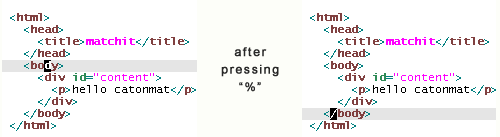
Matchit.vim extends this functionality. It's written by Benji Fisher and it adds support to cycle between if, else if, else, endif keywords in various programming languages. Another improvement is the ability to find pairs of HTML tags, such as <p> ... </p>. Another handy mapping is "g%" that does "%" in opposite direction (goes from endif to else to else if to if). The plugin also includes several other mappings like "]%", "[%" and "a%" but I could not figure out how to effectively use them in real life code, so I don't use them at all.
Here is another example. Suppose you are editing this HTML and you quickly want to go to the corresponding closing tag of <body>. Just press "%":
Overall it's a great plugin to have in your inventory!
How to install matchit.vim?
Matchit.vim has been included in vim since version 6.0. However there are newer versions of the script available with bug fixes and enhancements.
To get the latest version:
- 1. Download matchit.zip.
- 2. Extract matchit.zip to ~/.vim (on Unix/Linux) or ~\vimfiles (on Windows).
- 3. Run :helptags ~/.vim/doc (on Unix/Linux) or :helptags ~/vimfiles/doc (on Windows) to rebuild the tags file (so that you can read :help %, :help g%, etc.)
- 4. Restart Vim or source matchit.vim with ":so ~/.vim/plugin/matchit.vim" on Unix or ":so ~/vimfiles/plugin/matchit.vim" on Windows).
- 5. Use '%' to find corresponding
For Python programmers: Turns out the original matchit.vim plugin does not match if / elif / else. Benji extended matchit.vim itself and created "python_matchit.vim". This extension allows us to use the "%" key to cycle through if/elif/else, try/except/catch, for/continue/break, and while/continue/break structures. The script also defines g% to cycle in the opposite direction, and it defines two other motions, [% and ]%, go to the start and end of the current block, respectively.
How to install python_matchit.vim?
Python_matchit.vim is a filetype plugin. It has to be installed in "ftplugin" directory. Follow these steps to get it installed:
- 1. Download python_matchit.vim.
- 2. Put it in ~/.vim/ftplugin (on Unix/Linux) or ~\vimfiles\ftplugin (on Windows).
- 3. Restart Vim or source matchit.vim with ":so ~/.vim/ftplugin/python_matchit.vim" on Unix or ":so ~/vimfiles/ftplugin/python_matchit.vim" on Windows).
The same steps can be taken to install matchit for Ruby.
Have Fun!
Happy matching with matchit.vim!