
 Hello everyone! This is the seventh post in my new node.js modules you should know about article series.
The first post was about dnode - the freestyle rpc library for node, the second was about optimist - the lightweight options parser for node, the third was about lazy - lazy lists for node, the fourth was about request - the swiss army knife of HTTP streaming, the fifth was about hashish - hash combinators library, the sixth was about read - easy reading from stdin.
This time I'll introduce you to ntwitter - asynchronous Twitter REST, streaming and searching client API. This module is maintained by Charlie McConnell, aka AvianFlu. Ntwitter was actually created by technoweenie, but since then maintainers have changed several times.
To use it, you'll need to get the API keys. That can easily be done at dev.twitter.com. Just register a new App, and you'll get the keys.
Here is an example ntwitter app that tweets:
var twitter = require('ntwitter');

var twit = new twitter({
  consumer_key: 'Twitter',
  consumer_secret: 'API',
  access_token_key: 'keys',
  access_token_secret: 'go here'
});

twit
  .verifyCredentials(function (err, data) {
    if (err) {
      console.log("Error verifying credentials: " + err);
      process.exit(1);
    }
  })
  .updateStatus('Test tweet from ntwitter/' + twitter.VERSION,
    function (err, data) {
      if (err) console.log('Tweeting failed: ' + err);
      else console.log('Success!')
    }
  );
Here is how to search through ntwitter API:
var twitter = require('ntwitter');

var twit = new twitter({
  consumer_key: 'Twitter',
  consumer_secret: 'API',
  access_token_key: 'keys',
  access_token_secret: 'go here'
});

twit.search('nodejs OR #node', function(err, data) {
  if (err) {
    console.log('Twitter search failed!');
  }
  else {
    console.log('Search results:');
    console.dir(data);
  }
});
You can also use Twitter's streaming API:
var twitter = require('ntwitter');

var twit = new twitter({
  consumer_key: 'Twitter',
  consumer_secret: 'API',
  access_token_key: 'keys',
  access_token_secret: 'go here'
});

twit.stream('statuses/sample', function(stream) {
  stream.on('data', function (data) {
    console.log(data);
  });
});
Here is a list of all the possible statuses/* that you can stream from.
Note how you don't need to login into twitter to do searching and streaming.
You can stream someone's tweets this way:
var twitter = require('ntwitter');

var twit = new twitter({
  consumer_key: 'Twitter',
  consumer_secret: 'API',
  access_token_key: 'keys',
  access_token_secret: 'go here'
});

twit.stream('user', {track:'nodejs'}, function(stream) {
  stream.on('data', function (data) {
    console.dir(data);
  });
  stream.on('end', function (response) {
    // Handle a disconnection
  });
  stream.on('destroy', function (response) {
    // Handle a 'silent' disconnection from Twitter, no end/error event fired
  });
});
Finally, you can stream tweets from certain locations, defined by bounding boxes:
var twitter = require('ntwitter');

var twit = new twitter({
  consumer_key: 'Twitter',
  consumer_secret: 'API',
  access_token_key: 'keys',
  access_token_secret: 'go here'
});

twit.stream('statuses/filter', {'locations':'-122.75,36.8,-121.75,37.8,-74,40,-73,41'},
function(stream) {
  stream.on('data', function (data) {
    console.log(data);
  });
});
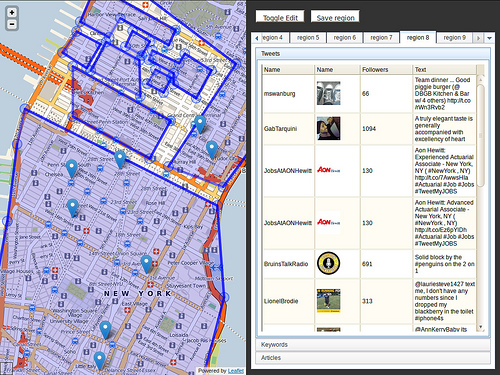
You can use Cole Gillespie's node-finden module to get the geographical coordinates for bounding boxes. Here is how Cole's software looks:
That's it. Super easy way to do all things twitter with ntwitter.
You can install ntwitter through npm as always:
npm install ntwitter
Ntwitter on GitHub: https://github.com/AvianFlu/ntwitter.