
A long, long time ago when I was mastering Linux I created three cheat sheets about GNU fileutils, GNU shellutils and GNU textutils. I kept keep them in front of me at all times and I quickly memorized which commands did what.
A few days ago I remembered about them and decided to publish them on my blog but it turned out fileutils, shellutils and textutils had been merged in GNU coreutils in 2003; so I thought why not create a new cheat sheet that lists all the utilities in coreutils along with their short descriptions.
Here is the GNU coreutils cheat sheet that lists all programs that are in this package.
 Download PDF | Download PNG | Download XLSX
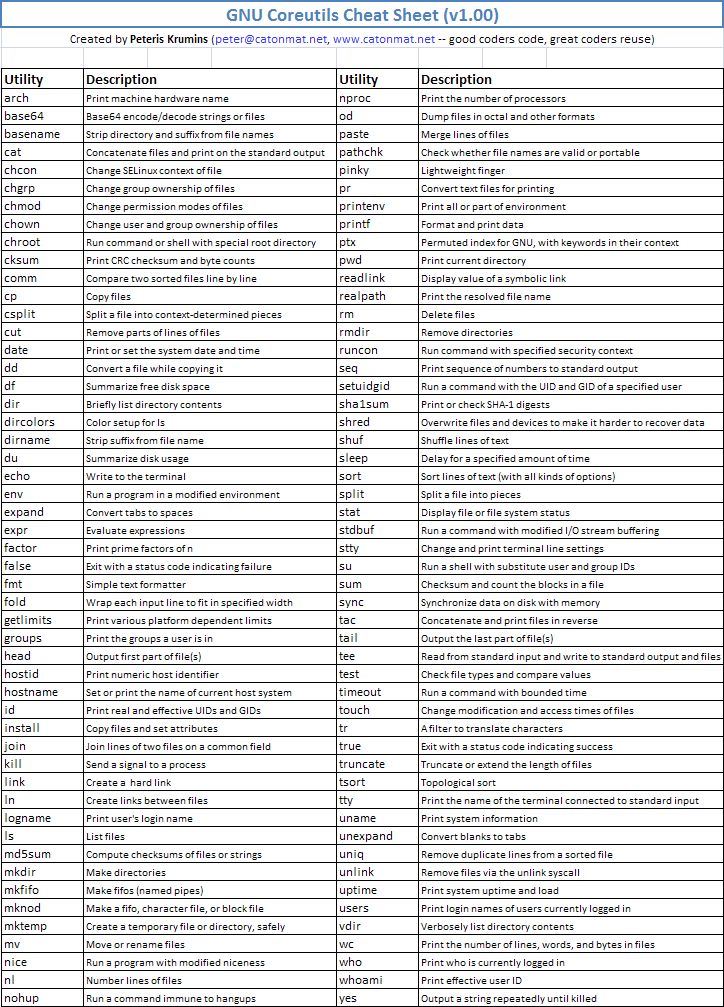
This cheat sheet is really useful if you're learning Linux and want to have a quick overview of all the available commands.
Bonus: Here are some of the commands that I used to create the cheat sheet:
$ curl 'http://www.gnu.org/software/coreutils/manual/coreutils.html' 2>/dev/null |
    grep 'h3 class' |
    grep 'class="command"' |
    sed 's/.*class="command">//' |
    sed 's|</span></samp>||' |
    sed 's|</h3>||' |
    grep ':' |
    sort
This one extracted command descriptions from the coreutils manual.
And:
$ wget 'http://ftp.gnu.org/gnu/coreutils/coreutils-8.13.tar.gz'
$ gunzip < coreutils-8.13.tar.gz | tar -vx
$ cd coreutils-8.13/src
$ find . -name '*.c' | sort | xargs head -1
This one extracted command descriptions from the program C source files.
I've also created a bunch of other cheat sheets. They include awk, ed, sed, perl, screen, and bash.
Enjoy this cheat sheet and until next time!