
 Last time I explained how YouTube videos can be downloaded with gawk programming language by getting the YouTube page where the video is displayed and finding out how the flash video player retrieves the FLV (flash video) media file.
This time I'll use Perl programming language which is my favorite language at the moment and write a one-liner which downloads a YouTube video.
Instead of parsing the YouTube video page, let's look how an embedded YouTube video player on a 3rd party website gets the video.
Let's go to this cool video and look at the embed html code:
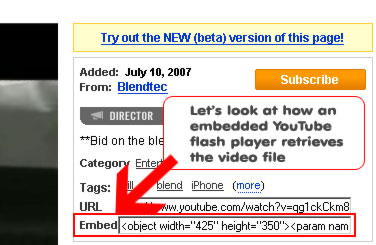
For this video it looks as following:
<object width="425" height="350"><param name="movie" value="http://www.youtube.com/v/qg1ckCkm8YI"></param><param name="wmode" value="transparent"></param><embed src="http://www.youtube.com/v/qg1ckCkm8YI" type="application/x-shockwave-flash" wmode="transparent" width="425" height="350"></embed></object>
95% of this code is boring, the only interesting part is this URL:
http://www.youtube.com/v/qg1ckCkm8YI
Let's load this in a browser, and as we do it, we get redirected to some other URL:
http://www.youtube.com/jp.swf?video_id=qg1ckCkm8YI&eurl=&iurl=http://img.youtube.com/vi/qg1ckCkm8YI/default.jpg&t=OEgsToPDskJCPW5DvMKeM3srnQ5e0LSY
So far we have no information how the flash player will retrieve the video, the only thing we know that 'iurl' stands for 'image url' and is the location of the thumbnail image.
Let's sniff the traffic again, this time with an excellent Internet Explorer plugin 'HttpWatch Professional'. This plugin displays all the requests the browser makes no matter if it's HTTP or HTTPS traffic and displays in a nice manner which makes our job much quicker than by using Ethereal. The FireFox's alternative to this tool is Live HTTP Headers extension which basically does the same as HttpWatch Professional but it takes more time to understand the output.
Here is what we see with HttpWatch Professional when we load the URL in the browser:
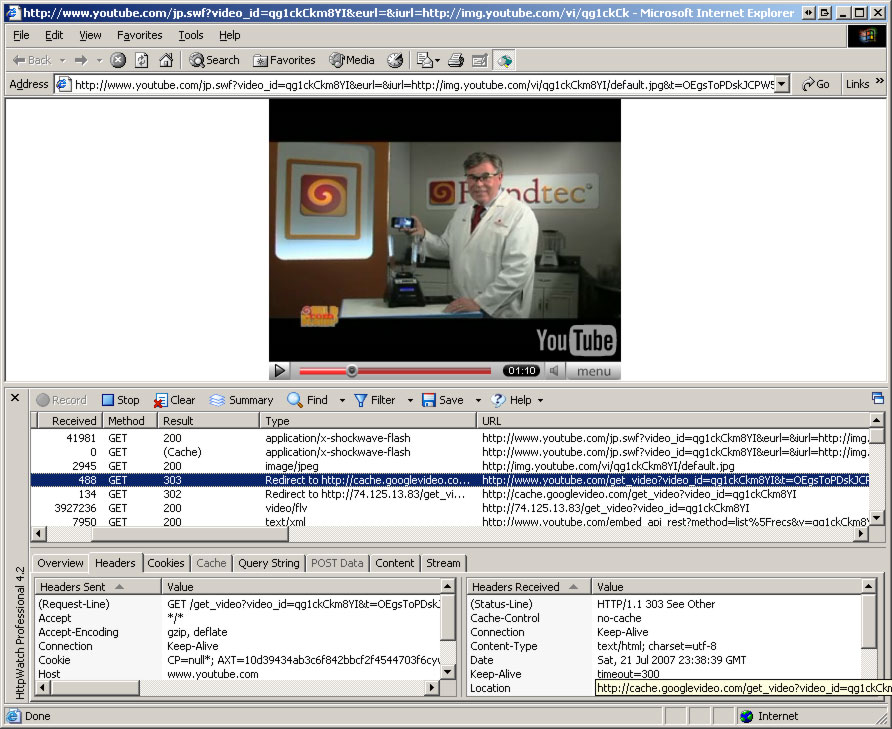
We see that to get a video browser first requested:
http://www.youtube.com/get_video?video_id=qg1ckCkm8YI&t=OEgsToPDskJ3bp4DEiMuxUmjx7oumUec&eurl=
then got redirected to:
http://cache.googlevideo.com/get_video?video_id=qg1ckCkm8YI
and then another time to:
http://74.125.13.83/get_video?video_id=qg1ckCkm8YI
This is exactly what what we saw in the previous article on downloading videos with gawk!
Now let's write a Perl one-liner that retrieves this video file!
What is a one-liner you might ask? Well, my definition of one liner is that it is a program you are willing to type out without saving it to disk.
First of all we will need some perl packages (modules) which will ease working with HTTP protocol. There are two widely used available on Perl's module archive (CPAN) - LWP and WWW::Mechanize.
WWW::Mechanize is built on top of LWP, so let's go to a higher level of abstraction and use this module.
The WWW::Mechanize package does not come as Perl's core package by default, so you'll have to get it installed. To do it, type
perl -MCPAN -eshell
In your console and when the CPAN shell appears, type
install WWW::Mechanize
to get the module installed.
If everything goes fine, the CPAN will tell you that the module got installed.
I don't want to go into Perl language's details again, also I don't want to go into WWW::Mechanize package's details.
If you want to learn Perl I recommend this article as a starter, these books and of course perldoc. Once you learn the basics you can quickly pick up the WWW::Mechanize package by reading the documentation, faq and trying examples.
Now finally let's write the one-liner. So what do we have to do?
First we have to retrieve
http://www.youtube.com/v/qg1ckCkm8YI
then follow the redirect (which WWW::Mechanize will do for us), then get the 't' identifier from query string and finally request and save output of
http://www.youtube.com/get_video?video_id=qg1ckCkm8YI&t=OEgsToPDskJ3bp4DEiMuxUmjx7oumUec&eurl=
That's it!
So here is the final version which can probably be made even shorter:
perl -MWWW::Mechanize -e '$_ = shift; s#http://|www\.|youtube\.com/|watch\?|v=|##g; $m = WWW::Mechanize->new; ($t = $m->get("http://www.youtube.com/v/$_")->request->uri) =~ s/.*&t=(.+)/$1/; $m->get("http://www.youtube.com/get_video?video_id=$_&t=$t", ":content_file" => "$_.flv")'
A little longer than a usual one-liner but does the job nicely. To keep it short, there is no error checking!
To use this one-liner just copy it to command line and specify the URL of a YouTube video (or just the ID of the video, or a variation of URL (like without 'http://'). Like this:
perl -MWWW::Mechanize -e '...' http://www.youtube.com/watch?v=l69Vi5IDc0g
or just
perl -MWWW::Mechanize -e '...' l69Vi5IDc0g
Let's spread this one liner to multiple lines and see what it does as it is not documented.
One could do the spreading out to multiple lines by hand, but that's not what humans are for, let's make Perl do it. By adding -MO=Deparse to the command line list we get the output of the Perl generated source code (i added line numbers myself):
use WWW::Mechanize;
1) $_ = shift @ARGV;
2) s[http://|www\.|youtube\.com/|watch\?|v=|][]g;
3) $m = 'WWW::Mechanize'->new;
4) ($t = $m->get("http://www.youtube.com/v/$_")->request->uri) =~ s/.*&t=(.+)/$1/;
5) $m->get("http://www.youtube.com/get_video?video_id=$_&t=$t", ':content_file', "$_.flv");
So our one liner is actually 5 lines.
- On line 1 we put the first argument of ARGV variable into special variable $_ so we could use advantage of it and save some typing.
- On line 2 we just leave the ID of the video by removing parts from the URL one by one so a user could specify the video URL in various formats like 'www.youtube.com/watch?v=ID, or just 'youtube.com?v=ID' or just 'v=ID' or even just 'ID'. The ID gets stored in the special $_ variable.
- On line 3 we create a WWW::Mechanize object we are going to use twice.
- Line 4 needs more explanation because we are doing so much in it. First it retrieves that embedded video URL I talked about earlier, the server actually redirects us away, so we have to look at the last request's location. We save this location into variable $t and then extract the 't' YouTube ID out.
- As a YouTube video is uniquely specifed with two IDs, the video ID and 't' ID, on line 5 we retrieve the file and tell WWW::Mechanize to save contents to the ID.flv file. WWW::Mechanize handles redirects for us so everything should work. Indeed, I tested it out and it worked.
I'm a huge fan of code golfing (making code as short as possible) so I spent a little bit of time golfing it. Here is what I came up with:
perl -MWWW::Mechanize -e '$_ = shift; ($y, $i) = m#(http://www\.youtube\.com)/watch\?v=(.+)#; $m = WWW::Mechanize->new; ($t = $m->get("$y/v/$i")->request->uri) =~ s/.*&t=(.+)/$1/; $m->get("$y/get_video?video_id=$i&t=$t", ":content_file" => "$i.flv")'
To use this one liner you must specify the full URL to youtube video, like this one:
http://www.youtube.com/watch?v=l69Vi5IDc0g
This one liner saves the "http://www.youtube.com" string in variable $y and the ID of the video in variable $i. The $y comes handy because we don't have to use the full YouTube URL, instead we use use $y.
Update 2018.12.05: YouTube has changed the way it displays videos several times! The current one-liner is here:
perl -MWWW::Mechanize -e '$m = WWW::Mechanize->new; $_=shift; ($i) = /v=(.+)/; s/%(..)/chr(hex($1))/ge for (($u) = $m->get($_)->content =~ /l_map": .+(?:%2C)?5%7C(.+?)"/); print $i, "\n"; $m->get($u, ":content_file" => "$i.flv")'
Can you golf it shorter?