
 We have been downloading and converting YouTube videos but have not looked at how to upload them.
In this post I'll teach you how to upload YouTube videos via the command line. To find out how a video is uploaded we will need just the Firefox browser.
Here is a typical scenario when you would want to automatically upload your videos to YouTube. Suppose you were using some other video sharing site and had already uploaded like 100 of your videos there. To get more popular on the net you'd also want to get your videos on YouTube, right? Doing it manually is a boring and tedious job, you want a program to do it for you while you produce new content.
Finding the YouTube Upload Form's Elements
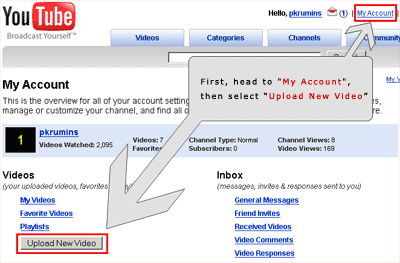
Log into your account and go to "My Account" menu in the upper right. Then press the "Upload New Video" button.
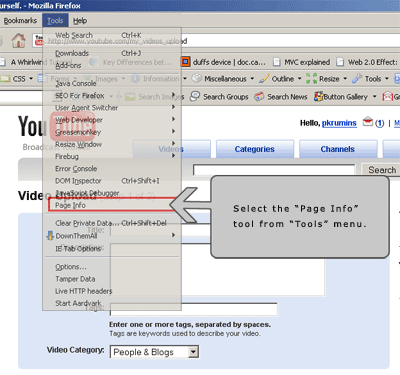
Now let's use Firefox's "Page Info" tool which is located under "Tools" menu.
When the "Page Info" tool pops up, select the "Forms" tab. The tool will list all the HTML forms on the page. The one named "theForm" with action's url "http://www.youtube.com/my_videos_upload" is the upload form! When a user uploads the video, it gets submitted. Our program will submit this form for us.
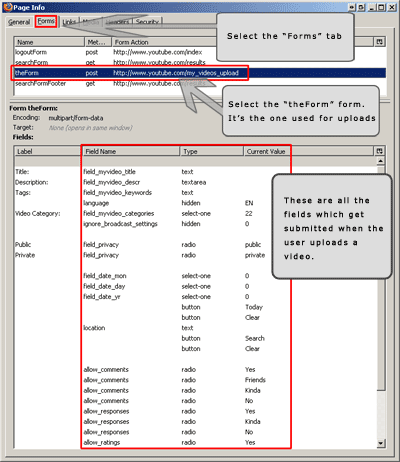
Now that we have found all the fields we need to submit, we can write the tool itself. I'll use my favorite programming language - Perl, again. It is perfect for this job because it has extremely good packages for working with HTTP protocol.
I will probably write another post just about the Perl programming language - how to get it working on Windows Operating System. For now, if you are running Windows, then you can download ActiveState's ActivePerl which is Perl's port to win.
Writing the Program
As I said, we will be creating the tool in Perl programming language. In the previous post about YouTube I used the WWW::Mechanize package. I can tell you in advance that it will not work this time because there will be some unexpected surprises, such as hidden form elements being created by Javascript when the form is submitted. Since WWW::Mechanize stores all the forms internally, it will not be able to submit this form with these dynamic form elements. That's why we will use the base class of WWW::Mechanize - the LWP::UserAgent.
LWP::UserAgent package can be installed with the following command:
perl -MCPAN -e 'install LWP::UserAgent'
Once you have it installed, we can start writing the program.
Step 1: Logging in to YouTube
Before we can upload a video, we need to login to YouTube. Let's use the same procedure as before to find out what form do we need to submit to login. Let's go to this url:
http://www.youtube.com/login
and look at all the forms on this page. One of them is named "loginForm" with four fields. We will need to submit this form and save the cookies. Luckily LWP::UserAgent can do it for us and we will not have to parse HTTP headers or anything like that.
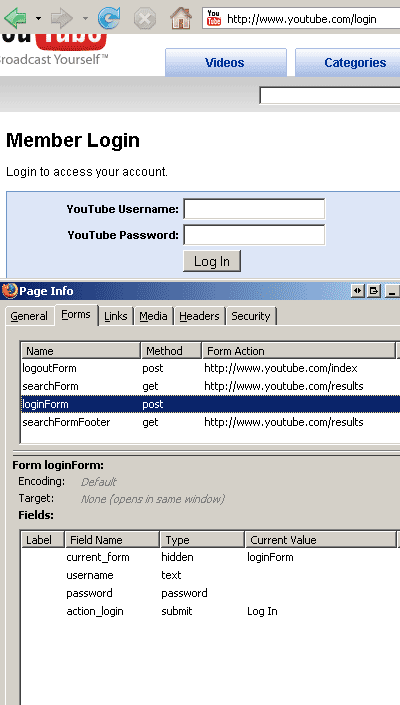
We see that there is no action URL provided for the loginForm, that means that the form should be POSTed to the same URL it was located on, in our case:
http://www.youtube.com/login
We also see that the form has 4 elements which should be submitted:
- 'current_form' with value 'loginForm'
- 'username' with our youtube login/username
- 'password' with our password, and
- 'action_login' with value 'Log In'
How would we submit this form with LWP::UserAgent? Easy - it has a member function $ua->post( $url, \%form, $header_field_name => $value, ... ), where %form is a hash of key, value pairs of form elements and $header_field_name => $value is a pair of HTTP headers we would like to add to the request.
Given an object of LWP::UserAgent named $ua, code which would login us to YouTube is the following:
$ua->post('http://www.youtube.com/login',
    {
        current_form => 'loginForm',
        username     => 'youtube_login',
        password     => 'youtube_password',
        action_login => 'Log In'
    },
);
See how easy it was? I love it.
The only problem is how to detect if we have really logged in. I noticed that when we log in, the upper right menu has a 'Log Out' button. So if we logged in succesfully, we should find this button.
Step 2: Uploading the Video
Now, once we have logged in, let's upload the video.
Here is the image with all the fields we have to submit to upload a video, once more:
There are 17 fields totally:
- "field_myvideo_title" - title of the video
- "field_myvideo_descr" - description of the video
- "field_myvideo_keywords" - comma separated tags
- "field_myvideo_categories" - video category
- "language" - language of the video, i'll leave it "EN" for English
- "action_upload" - a string "Upload a video..."
- "session_token" - we will have to extract the session token for this upload
- "allow_embeddings" - should the video be allowed to be embedded on other sites, i'll leave the default "Yes"
- "allow_responses" - should we allow video responses, i'll leave the default "Yes"
- "allow_comments" - should we allow comments on the video, i'll leave the default "Yes"
- "allow_ratings" - should we allow users to rate the vide, i'll leave the default "Yes"
- "location" - latitude and longitude of the location video was shot, i'll leave it empty
- "field_date_mon" - month the video was shot, i'll use default 0 (unknown)
- "field_date_day" - day the video was shot, i'll use 0 (unknown)
- "field_date_yr" - year the video was shot, i'll use 0 (unknown)
- "field_privacy" - privacy of video (public or private), i'll use the default - "public"
- "ignore_broadcast_settings" - no idea what this is, i'll use the default value 0
The trickiest part here is to extract the "session_token" which is some kind of unique id.
Going through the HTML source of upload page:
http://www.youtube.com/my_videos_upload
We find a javascript function called "dynamic_append_session_token" which dynamically creates a hidden form element containing the session ID:
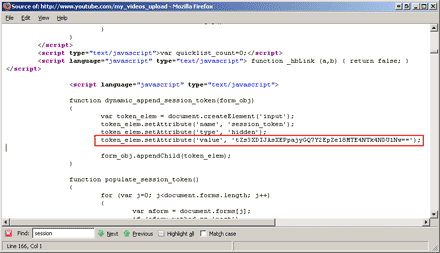
We have to extract this session ID from the line in red. It can be done with the following regular expression:
token_elem\.setAttribute\('value', '(.+?)'\);
Update 2008.03.12: This is no longer true! A session cookie is represented by a variable now:
var gXSRF_token = 'OTxXiSg8O-oQFB-PWTSaDv7oX2V8MTIwNTQ1NzYxNQ==';
When we have done this, we can submit the form. For this form we will need to add a "Content-Type: form-data" header to the request because the upload form has explicitly stated that its "enctype" is "multipart/form-data".
As it turns out the actual video upload process is a two step process. This was the first step which set the video information. After we submit this form, we get redirected to a page which contains the upload file selection form. It might seem that that is the only element in this form but not so. Actually this 2nd step form has a few new fields and it also has all the fields from 1st step as hidden elements. Here are the modified and added fields in the 2nd step:
- "contact" - no idea what this field is for
- "field_command" - always "myvideo_submit"
- "field_uploadfile" - our video file we want to upload
- "field_private_share_entities" - no idea
- "action_upload" - submit button's caption "Upload Video"
- "addresser" - another mysterious unique id
Here is what page info tool shows us about 2nd step's form elements:
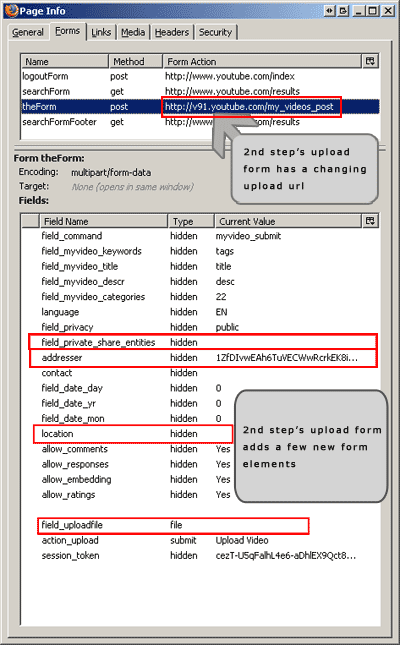
Notice that the form's action URL changes, we have to extract it from the html source. Someone might suggest not to use regexes for parsing HTML but it is perfectly ok for this tiny project.
The trickiest thing here is telling LWP::UserAgent that 'field_uploadfile' is a form element of 'file' type. If we look in the LWP::UserAgent's documentation we find that the three argument post() subroutine uses "POST() function from HTTP::Request::Common to build the request." Further looking in the HTTP::Request::Common documentation we find that to specify a file to be uploaded the field has to be an array ref looking like this: [ $file, $filename, Header => Value... ].
That's it. When we submit this form the video should have been uploaded. Now we just need to detect if the upload was successful. I noticed that when the video has uploaded successfully, YouTube thanks me for uploading. It looks like this:
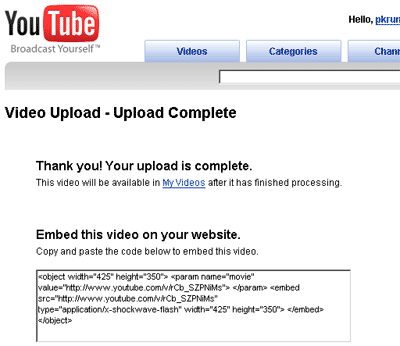
So checking if a video uploaded successfully is reduced to checking for the thank you message.
The program can be used from command line and takes a few mandatory arguments:
Usage: perl ytup.pl -l [login] -p [password] -f <video file> -c <category> -t <title> -d <description> -x <comma, separated, tags>

The login (-l) and password (-p) arguments are not mandatory because not to expose your password on a publically shared machine (by looking at process list) they can be specified in the source file by changing YT_LOGIN and YT_PASS constants.

Possible categories (for -c switch):
2    - Autos & Vehicles
23   - Comedy
24   - Entertainment
1    - Film & Animation
20   - Gadgets & Games
26   - Howto & DIY
10   - Music
25   - News & Politics
22   - People & Blogs
15   - Pets & Animals
17   - Sports
19   - Travel & Places
Here is the final code:
#!/usr/bin/perl
#
# Peter Krumins (peter@catonmat.net)
# https://catonmat.net  --  good coders code, great reuse
#

use constant VERSION => "1.3";

use strict;
use warnings;

use LWP::UserAgent;
use HTML::Entities 'decode_entities';
use Getopt::Std;
$Getopt::Std::STANDARD_HELP_VERSION = 1;

# debug?
use constant DEBUG => 0;

# set these values for default -l (login) and -p (pass) values
#
use constant YT_LOGIN => "";
use constant YT_PASS  => "";

# video categories
#
my %cats = (
    2   =>  'Autos & Vehicles',
    23  =>  'Comedy',
    27  =>  'Education',
    24  =>  'Entertainment',
    1   =>  'Film & Animation',
    20  =>  'Gaming',
    26  =>  'Howto & Style',
    10  =>  'Music',
    25  =>  'News & Politics',
    29  =>  'Nonprofits & Activism',
    22  =>  'People & Blogs',
    15  =>  'Pets & Animals',
    28  =>  'Science & Technology',
    17  =>  'Sports',
    19  =>  'Travel & Places'
);

# various urls
my $login_url      = 'http://www.youtube.com/login';
my $login_post_url = 'https://www.google.com/accounts/ServiceLoginAuth?service=youtube';
my $login_cont_url = 'http://www.youtube.com/';
my $upload_url     = 'http://upload.youtube.com/my_videos_upload?restrict=html_form';
my $upload_video_url1 = 'http://www.youtube.com/gen_204?a=multi_up_queue&si=%SI%&uk=%UK%&ac=1&gbe=1&fl=0&b=0&fn=0&ti=1&d=0&ta=0&pv=0&c=0&m=0&t=0&ft=0&dn=upload.youtube.com&fe=scotty&ut=html_form';
my $upload_video_url2 = 'http://upload.youtube.com/upload/rupio';
my $upload_video_url3 = 'http://www.youtube.com/gen_204?a=multi_up_start&si=%SI%&uk=%UK%&ac=1&gbe=1&fl=0&b=0&fn=0&ti=1&d=0&ta=0&pv=0&c=0&m=0&t=0&ft=0&dn=upload.youtube.com&fe=scotty&ut=html_form';
my $upload_video_url4 = 'http://www.youtube.com/gen_204?a=multi_up_finish&si=%SI%&uk=%UK%&ac=1&gbe=1&fl=0&b=0&fn=0&ti=1&d=0&ta=0&pv=0&c=0&m=0&t=23001&ft=0&dn=upload.youtube.com&fe=scotty&ut=html_form';
my $upload_video_set_info = 'http://upload.youtube.com/my_videos_upload_json';

unless (@ARGV) {
    HELP_MESSAGE();
    exit 1;
}

my %opts;
getopts('l:p:f:c:t:d:x:', \%opts);

# if -l or -p are not given, try to use YT_LOGIN and YT_PASS constants
unless (defined $opts{l}) {
    unless (length YT_LOGIN) {
        preamble();
 print "Youtube username/login as neither defined nor passed as an argument\n";
        print "Use -l switch to specify the username\n";
        print "Example: -l joe_random\n";
        exit 1;
    }
    else {
        $opts{l} = YT_LOGIN;
    }
}

unless (defined $opts{p}) {
    unless (length YT_PASS) {
        preamble();
        print "Password was neither defined nor passed as an argument\n";
        print "Use -p switch to specify the password\n";
        print "Example: -p secretPass\n";
        exit 1;
    }
    else {
        $opts{p} = YT_PASS;
    }
}

unless (defined $opts{f} && length $opts{f}) {
    preamble();
    print "No video file was specified\n";
    print "Use -f switch to specify the video file\n";
    print 'Example: -f "C:\Program Files\movie.avi"', "\n";
    print 'Example: -f "/home/pkrumins/super.cool.video.wmv"', "\n";
    exit 1;
}

unless (-r $opts{f}) {
    preamble();
    print "Video file is not readable or does not exist\n";
    print "Check the permissions and the path to the file\n";
    exit 1;
}

unless (defined $opts{c} && length $opts{c}) {
    preamble();
    print "No video category was specified\n";
    print "Use -c switch to set the category of the video\n";
    print "Example: -c 20, would set category to Gadgets & Games\n\n";
    print_cats();
    exit 1;
}

unless (defined $cats{$opts{c}}) {
    preamble();
    print "Category '$opts{c}' does not exist\n\n";
    print_cats();
    exit 1;
}

unless (defined $opts{t} && length $opts{t}) {
    preamble();
    print "No video title was specified\n";
    print "Use -t switch to set the title of the video\n";
    print 'Example: -t "Super Cool Video Title"', "\n";
    exit 1;
}

unless (defined $opts{d} && length $opts{d}) {
    preamble();
    print "No video description was specified\n";
    print "Use -d switch to set the description of the video\n";
    print 'Example: -d "The coolest video description"', "\n";
    exit 1;
}

unless (defined $opts{x} && length $opts{x}) {
    preamble();
    print "No tags were specified\n";
    print "Use -x switch to set the tags\n";
    print 'Example: -x "foo, bar, baz, hacker, purl"', "\n";
    exit 1;
}

# tags should be at least two chars, can't be just numbers
my @tags = split /,\s+/, $opts{x};
my @filtered_tags = grep { length > 2 && !/^\d+$/ } @tags;
unless (@filtered_tags) {
    preamble();
    print "Tags must at least two chars in length and must not be numeric!\n";
    print "For example, 'foo', 'bar', 'yo29' are valid tags, but ";
    print "'22222', 'hi', 'b9' are invalid\n";
    exit 1;
}

$opts{x} = join ', ', @filtered_tags;
# create the user agent, have it store cookies and
# pretend to be a cool windows firefox browser
my $ua = LWP::UserAgent->new(
    cookie_jar => {},
    agent => 'Mozilla/5.0 (Windows; U; Windows NT 5.1; en-US; rv:1.8.1.4) '.
             'Gecko/20070515 Firefox/2.0.0.4'
);

if (DEBUG) {
    $ua->add_handler("request_send",  sub { print "Request: \n"; shift->dump; print "\n"; return });
    $ua->add_handler("response_done", sub { print "Response: \n"; shift->dump; print "---\n"; return });
}

# let the user agent follow redirects after a POST request
push @{$ua->requests_redirectable}, 'POST';

print "Logging in to YouTube...\n";
login();

print "Uploading the video ($opts{t})...\n";
upload();

print "Done!\n";

sub login {
    # go to login page to get redirected to google sign in page
    my $res = $ua->get($login_url);
    unless ($res->is_success) {
        die "Failed going to YouTube's login URL: ", $res->status_line;
    }

    # extract GALX id
    my $GALX = extract_field($res->content, qr/name="GALX".+?value="([^"]+)"/s);
    unless ($GALX) {
        die "Failed logging in. Unable to extract GALX identifier from Google's login page.";
    }

    # submit the login form
    $res = $ua->post($login_post_url,
        {
            ltmpl    => 'sso',
            continue => 'http://www.youtube.com/signin?action_handle_signin=true&nomobiletemp=1&hl=en_US&next=%2F',
            service  => 'youtube',
            uilel    => 3,
            hl       => 'en_US',
            GALX     => $GALX,
            Email    => $opts{l},
            Passwd   => $opts{p},
            rmShown  => 1,
            signIn   => 'Sign in',
            asts     => ''
        }
    );
    unless ($res->is_success) {
        die "Failed logging in: failed submitting login form: ",
            $res->status_line;
    }

    # Get the meta http-equiv="refresh" url
    my $next_url = extract_field($res->content, qr/http-equiv="refresh" content="0; url='(.+?)'/);
    unless ($next_url) {
        die "Failed logging in. Getting next url from http-equiv failed.";
    }
    $next_url = decode_entities($next_url);

    $res = $ua->get($next_url);
    unless ($res->is_success) {
        die "Failed logging in. Extraction of next_url failed: ",
            $res->status_line;
    }

    $res = $ua->get($login_cont_url);
    unless ($res->is_success) {
        die "Failed logging in. Navigation to YouTube.com failed: ",
            $res->status_line;
    }

    # We have no good way to check if we really logged in.
    # I found that when you have logged in the upper right menu changes
    # and you have access to 'Sign Out' option.
    # We check for this string to see if we have logged in.
    unless ($res->content =~ />Sign Out</) {
        die "Failed logging in: username/password incorrect";
    }
}

sub upload {
    # upload is actually a multistep process
    #

    # get upload page to extract some gibberish info
    my $resp = $ua->get($upload_url);
    unless ($resp->is_success) {
        die "Failed getting $upload_url: ", $resp->status_line;
    }

    my $SI = extract_field($resp->content, qr/"sessionKey": "([^"]+)"/);
    unless ($SI) {
        die "Failed extracting sessionKey. YouTube might have redesigned!";
    }

    my $UK = extract_field($resp->content, qr/"uploadKey": "([^"]+)"/);
    unless ($UK) {
        die "Failed extracting uploadKey. YouTube might have redesigned!";
    }

    my $session_token = extract_field($resp->content, qr/"session_token" value="([^"]+)"/);
    unless ($session_token) {
        die "Failed extracting session_token. YouTube might have redesigned!";
    }

    prepare_upload_urls($SI, $UK);

    # tell the server that we are up for uploads
    $resp = $ua->get($upload_video_url1);
    unless ($resp->is_success) {
        die "Failed getting upload_video_url1: ", $resp->status_line;
    }

    # now lets post some more gibberish data
my $post_data_gibberish =<<EOL;
{"protocolVersion":"0.7","createSessionRequest":{"fields":[{"external":{"name":"file","filename":"$opts{f}","formPost":{}}},{"inlined":{"name":"return_address","content":"upload.youtube.com","contentType":"text/plain"}},{"inlined":{"name":"upload_key","content":"$UK","contentType":"text/plain"}},{"inlined":{"name":"action_postvideo","content":"1","contentType":"text/plain"}},{"inlined":{"name":"live_thumbnail_id","content":"$SI.0","contentType":"text/plain"}},{"inlined":{"name":"parent_video_id","content":"","contentType":"text/plain"}},{"inlined":{"name":"allow_offweb","content":"True","contentType":"text/plain"}},{"inlined":{"name":"uploader_type","content":"Web_HTML","contentType":"text/plain"}}]},"clientId":"scotty html form"}
EOL

    $resp = $ua->post($upload_video_url2, Content => $post_data_gibberish);
    unless ($resp->is_success) {
        die "Failed posting gibberish to upload_video_url2: ", $resp->status_line
    }

    # extract the file upload url
    my $file_upload_url = extract_field($resp->content, qr/"url":"([^"]+)"/);
    unless ($file_upload_url) {
        die "Failed extracting file upload url. YouTube might have redesigned!";
    }

    # now lets tell the server that we are starting to upload
    $resp = $ua->get($upload_video_url3);
    unless ($resp->is_success) {
        die "Failed getting upload_video_url3: ", $resp->status_line;
    }

    # now lets post the video
    $resp = $ua->post($file_upload_url,
        {
            Filedata => [ $opts{f} ]
        },
        "Content_Type" => "form-data"
    );

    unless ($resp->is_success) {
        die "Failed uploading the file: ", $resp->status_line;
    }

    my $video_id = extract_field($resp->content, qr/"video_id":"([^"]+)"/);

    # tell the server that we are done
    $resp = $ua->get($upload_video_url4);
    unless ($resp->is_success) {
        die "Failed getting upload_video_url4: ", $resp->status_line;
    }

    # finally set the video info
    $resp = $ua->post($upload_video_set_info,
        {
            session_token     => $session_token,
            action_edit_video => 1,
            updated_flag      => 0,
            video_id          => $video_id,
            title             => $opts{t},
            description       => $opts{d},
            keywords          => $opts{x},
            category          => $opts{c},
            privacy           => 'public'
        }
    );

    unless ($resp->is_success) {
        die "Failed setting video info (but it uploaded ok!): ", $resp->status_line;
    }

    if ($resp->content =~ /"errors":\s*\[(.+?)\]/) {
        die "The video uploaded OK, but there were errors setting the video info:\n", $1;
    }
}

sub prepare_upload_urls {
    my ($SI, $UK) = @_;
    for ($upload_video_url1, $upload_video_url3, $upload_video_url4)
    {
        s/%SI%/$SI/;
        s/%UK%/$UK/;
    }
}

sub extract_field {
    my ($content, $rx) = @_;
    if ($content =~ /$rx/) {
        return $1
    }
}

sub HELP_MESSAGE {
    preamble();
    print "Usage: $0 ",
          "-l [login] ",
          "-p [password] ",
          "-f <video file> ",
          "-c <category> ",
          "-t <title> ",
          "-d <description> ",
          "-x <comma, separated, tags>\n\n";
    print_cats();
}

sub print_cats {
    print "Possible categories (for -c switch):\n";
    printf "%-4s - %s\n", $_, $cats{$_} foreach (sort {
        $cats{$a} cmp $cats{$b}
    } keys %cats);
}

sub VERSION_MESSAGE {
    preamble();
    print "Version: v", VERSION, "\n";
}

sub preamble {
    print "YouTube video uploader by Peter Krumins (peter\@catonmat.net)\n";
    print "https://catonmat.net  --  good coders code, great reuse\n";
    print "\n"
}
Download Youtube Uploader
Download link: catonmat.net/ftp/ytup.perl
I hope you liked this tutorial and see you next time!