
post 'good coders code, great reuse' to del.icio.us post 'good coders code, great reuse' to digg post 'good coders code, great reuse' to reddit subscribe to 'good coders code, great reuse' posts via feed
good coders code, great reuse

The ability to simplify means to eliminate the unnecessary so that the necessary may speak.

Hans Hoffmann

I am now on Twitter! Meet me on Twitter here (my nick is pkrumins.)
Or on Google Buzz and Facebook.

Computer Science 26 Feb 2010 07:45 am
1 Star2 Stars3 Stars4 Stars5 Stars (6 votes, average: 5 out of 5)
Loading ... Loading ...

I was reading Knuth’s “Selected Papers on Computer Science” and in chapter 13 “The IBM 650: An Appreciation from the Field” he had included a photo of a young himself from 1958 at his first computer.

Young Donald Knuth from 1958 at an IBM 650 Computer
Young Donald Knuth, age 20, at his first IBM 650 computer in 1958.

Don Knuth’s first computer, as the chapter’s title suggests, was the IBM 650. At that time Knuth had a part-time job helping the statisticians at Case Institute of Technology to draw graphs and do keypunching. Soon a strange new machine was installed across the hall, that the student newspaper called a “giant brain”. It was actually an IBM 650.

One afternoon someone at the institute explained some of the machine’s internal code to a bunch of freshmen, including Knuth. It all sounded mysterious to him, but it seemed to make a bit of sense, so he got ahold of some manuals. His first chance to try the machine came a few weeks later, when one of the upperclassmen at the fraternity needed to know the five roots of a particular fifth degree equation. Knuth decided to compute the roots using the 650. This was his first program on the 650.

Later Knuth realized how lucky he was to have had such a good first encounter with computers. The polynomial problem was well matched to his mathematical knowledge and interests, and he had a chance for hands-on experience, pushing buttons on the machine and seeing it punch the cards containing the answers.

Knuth’s first large program was a tic-tac-toe that learned to play by remembering the relative desirability or undesirability of each position that it had ever encountered. The hardest part, as Knuth writes, was figuring out how to keep one digit of memory for each possible configuration of the board. The machine had just 2000 words of memory, each 10 digits long, plus a sign bit.

Next Knuth proceeded to writing a program that would find prime factors. The idea was that a person could set up any 10-digit number in the console switched and start his program, which would punch the corresponding prime factors on a card and stop. Knuth spent several weeks on this problem, rewriting his program several times. The final program took 11 minutes to determine that the number 9999999967 was prime.

The next major Knuth’s program was the improvement of SOAP (Symbolic Optimal Assembly Program) and SOAP II assembly languages. He wrote SOAP III and learned about “creeping featurism,” where each of his friends would suggest different things they wanted in an assembler. The program used all 2000 words of memory. Knuth doesn’t think he could have gotten by with only 1999 words, because he had spent considerable time finding every last bit of space by using terrible tricks, such as using a single instruction on a specific address that would cause 4 side effects.

Along the way Knuth wrote a lot fun programs. One of the competitions between the students was to do as much as possible with programs that would fit on a single punch card - which had room for only eight instructions. One of the unsolved problems was to take the 10-digit number on the console and to reverse its digits from left to right, then display the answer and stop; nobody could figure out how to do this on a signle card. But one day Knuth proudly marched up to the machine and made a demonstration: he read in a card, then dialled the number 0123456789 on the console, and started the machine. Sure enough, it stopped, displaying the number 9876543210. Everybody applauded. He didn’t explain until later that his card would display the number 9876543210 regardless of what number appeared on the console switches. :)

But there is more to the story. One day the IBM 650 machine got an extra set of console switches, that were called register 8004 (top row of switches in the picture). It turned out that nine instructions on an extended 650 were sufficient to reverse the digits of a number, and the ninth instruction could be put into the switches. Therefore he was able to solve the problem without cheating.

Knuth was very close with IBM 650. One night he missed a date with his wife-to-be, because he was so engrossed in debugging that he had forgotten all about the time.

The 650 provided Knuth with solid instruction in the art of programming. It was directly related to the topics of the first two technical articles he ever submitted for publication. Therefore it’s not surprising at all that he decided to dedicate The Art of Computer Programming books to the IBM 650 computer. “This series of books is affectionately dedicated to the Type 650 computer once installed at Case Institute of Technology, in remembrance of many pleasant evenings.”

The End.

If you liked this story, you may want to get Knuth’s book “Selected Papers on Computer Science“. The collection focuses on Knuth’s publications that are addressed primarily to a general audience than to specialists.

Comments (6) Comments | Email Post Email 'Donald Knuth’s First Computer' to a friend | Print Post Print 'Donald Knuth’s First Computer' | Permalink Permalink to 'Donald Knuth’s First Computer' | Trackback Trackback to 'Donald Knuth’s First Computer'
(Popularity: 7%) 11,882 Views

Did you like this page? Subscribe to my posts!

I am now on Twitter! Meet me on Twitter here (my nick is pkrumins.)
Or on Google Buzz and Facebook.

Computer Science 19 Feb 2010 09:40 am
1 Star2 Stars3 Stars4 Stars5 Stars (6 votes, average: 4.5 out of 5)
Loading ... Loading ...

Y-CombinatorIn this post I’ll derive the Y-combinator and explain all the steps taken. The key to understanding the Y-combinator is knowing precisely what it does. I am sure many people never understand Y-combinator because of this very reason, or because the introduction is too lengthy to comprehend. Therefore I’ll give the shortest possible explanation of Y-combinator before I derive it so that you know what the end result should be.

The Y-combinator allows an anonymous function to call itself, that is, it allows anonymous function recursion. Since anonymous functions don’t have names, they can’t refer to themselves easily. The Y-combinator is a clever construct helps them to refer to themselves. That’s it. That’s all the Y-combinator does. Remember that.

I’ll use the Scheme programming language to derive the Y-combinator. My derivation is based on the one in “The Little Schemer” book. Here it is.

Suppose we want to write the length function, which, given a list, returns the number of elements in it. It’s really easy if we can give the function a name:

(define length
  (lambda (list)
    (cond
      ((null? list) 0)
      (else
        (add1 (length (cdr list)))))))

But now suppose that we can’t give names - we can only use anonymous functions:

(lambda (list)
  (cond
    ((null? list) 0)
    (else
      (add1 (??? (cdr list)))))))

Suddenly there is no way this anonymous function can refer to itself. What do we put in ???? We can’t refer to the name length anymore because it’s an anonymous function, which doesn’t have any name. One thing we can try is to put the function itself in the place of ???:

(lambda (list)
  (cond
    ((null? list) 0)
    (else
      (add1 (

  (lambda (list)                   ; the
    (cond                          ;
      ((null? list) 0)             ; function
      (else                        ;
       (add1 (??? (cdr list))))))  ;itself

  (cdr list))))))

This is not much better, we are still left with ???. But there is a bright side to it, this function can determine lengths of lists with one element and no elements. Let’s try inserting the same anonymous function in place of ??? again:

(lambda (list)
  (cond
    ((null? list) 0)
    (else
      (add1 (
  (lambda (list)
    (cond
      ((null? list) 0)
      (else
       (add1 (
    (lambda (list)
      (cond
        ((null? list) 0)
        (else
         (add1 (??? (cdr list))))))
    (cdr list))))))
  (cdr list))))))

Now this function can determine lengths of lists with 0, 1 and 2 elements. If we continue this way, we can construct the length function for lists with a certain number of elements. But this is not what we want, we the real length function that works for lists with any number of elements.

As we all know, repeating code is not a good thing. Let’s try to factor out the repetitions and rewrite the original anonymous function slightly. Instead of leaving ??? in the code, let’s pass it to an anonymous function via an argument called length.

((lambda (length)
   (lambda (list)
     (cond
       ((null? list) 0)
       (else
        (add1 (length (cdr list)))))))
 ???)

Notice that this code invokes the first lambda (length) function and passes it ??? as the length argument. This function in turn returns the original anonymous function:

(lambda (list)
  (cond
    ((null? list) 0)
    (else
     (add1 (??? (cdr list))))))

Now let’s try constructing the previous two length functions that work for lists with a maximum of one and two elements. First the function for lists with a maximum of one element:

((lambda (f)
   (lambda (list)
     (cond
       ((null? list) 0)
       (else
        (add1 (f (cdr list)))))))
 ((lambda (g)
   (lambda (list)
     (cond
       ((null? list) 0)
       (else
        (add1 (g (cdr list)))))))
 ???))

Here ??? first gets passed to lambda (g), which returns the original anonymous function, which then gets passed to lambda (f), which in turn returns the function that works for lists with one element:

(lambda (list)
  (cond
    ((null? list) 0)
    (else
      (add1 (
  (lambda (list)
    (cond
      ((null? list) 0)
      (else
       (add1 (??? (cdr list))))))
  (cdr list))))))

Similarly, the following code returns a function that works for lists with a maximum of two elements:

((lambda (f)
   (lambda (list)
     (cond
       ((null? list) 0)
       (else
        (add1 (f (cdr list)))))))
 ((lambda (g)
   (lambda (list)
     (cond
       ((null? list) 0)
       (else
        (add1 (g (cdr list)))))))
 ((lambda (h)
   (lambda (list)
     (cond
       ((null? list) 0)
       (else
        (add1 (h (cdr list)))))))
 ???)))

Since the argument names f, g,h in (lambda (f) ...), (lambda (g) ...), (lambda (h) ...) are independent, we can rename all of them to length, to make it look more similar to the length function:

((lambda (length)
   (lambda (list)
     (cond
       ((null? list) 0)
       (else
        (add1 (length (cdr list)))))))
 ((lambda (length)
   (lambda (list)
     (cond
       ((null? list) 0)
       (else
        (add1 (length (cdr list)))))))
 ((lambda (length)
   (lambda (list)
     (cond
       ((null? list) 0)
       (else
        (add1 (length (cdr list)))))))
 ???)))

We are still repeating code. The obvious thing we can do about it is create an anonymous function called mk-length (make length) that creates this code for us:

((lambda (mk-length)
   (mk-length ???))
 (lambda (length)
   (lambda (list)
     (cond
       ((null? list) 0)
       (else
        (add1 (length (cdr list))))))))

This is pretty tricky. Observe how (lambda (mk-length) ...) gets the (lambda (length) ...) function passed as the mk-length argument, which in turn accepts ??? as an argument and returns our original anonymous function:

(lambda (list)
  (cond
    ((null? list) 0)
    (else
     (add1 (??? (cdr list))))))

Now let’s try constructing length functions for lists of length one and two. For the list of length one, we just need to apply mk-length on itself:

((lambda (mk-length)
   (mk-length
     (mk-length ???)))
 (lambda (length)
   (lambda (list)
     (cond
       ((null? list) 0)
       (else
        (add1 (length (cdr list))))))))

Let’s go through this code. First (lambda (length) ...) gets passed to the lambda (mk-length) function as the mk-length argument. Then it applies the result of (mk-length ???) (which is the original anonymous function) to the mk-length. This produces our well known function that works on lists with one or none elements:

(lambda (list)
  (cond
    ((null? list) 0)
    (else
      (add1 (
  (lambda (list)
    (cond
      ((null? list) 0)
      (else
       (add1 (??? (cdr list))))))
  (cdr list))))))

Similarly, by adding another call to mk-length, we get the function that works for lists with two or less elements:

((lambda (mk-length)
   (mk-length
     (mk-length
       (mk-length ???)))
 (lambda (length)
   (lambda (list)
     (cond
       ((null? list) 0)
       (else
        (add1 (length (cdr list))))))))

Now, since we don’t know what ??? is, let’s just call it mk-length and see what happens:

((lambda (mk-length)
   (mk-length mk-length))
 (lambda (length)
   (lambda (list)
     (cond
       ((null? list) 0)
       (else
        (add1 (length (cdr list))))))))

Nothing bad actually happens, we still get the same original anonymous function, except in place of ??? we have the function:

(lambda (length)
  (lambda (list)
    (cond
      ((null? list) 0)
      (else
       (add1 (length (cdr list)))))))

Notice also that argument names mk-length and length in lambda (mk-length) and lambda (length) are independent. Therefore we can rename length to mk-length to remind that the first argument to mk-length is mk-length:

((lambda (mk-length)
   (mk-length mk-length))
 (lambda (mk-length)
   (lambda (list)
     (cond
       ((null? list) 0)
       (else
        (add1 (mk-length (cdr list))))))))

And now comes the key trick. We replace mk-length with a self-application (mk-length mk-length):

((lambda (mk-length)
   (mk-length mk-length))
 (lambda (mk-length)
   (lambda (list)
     (cond
       ((null? list) 0)
       (else
        (add1 ((mk-length mk-length) (cdr list))))))))

If you try this code out, you’ll see that it returns the length of a list for any list. Here is an example of applying it to a list of 10 elements:

(((lambda (mk-length)
   (mk-length mk-length))
 (lambda (mk-length)
   (lambda (list)
     (cond
       ((null? list) 0)
       (else
        (add1 ((mk-length mk-length) (cdr list))))))))
 '(a b c d e f g h i j))

The function works because it keeps adding recursive uses by passing mk-length to itself, just as it is about to expire. This is not yet the Y-combinator, but we have successfully managed to recursively call an anonymous function. Now we need to massage the code a bit to separate the anonymous function from the self-applicative code.

The first step is to move the self-applicative code out as much as possible:

((lambda (mk-length)
   (mk-length mk-length))
 (lambda (mk-length)
   ((lambda (length)
      (lambda (list)
        (cond
          ((null? list) 0)
          (else
           (add1 (length (cdr list)))))))
   (lambda (x)
     ((mk-length mk-length) x)))))

Now the code in bold looks very much like the length function we need! Let’s move it outside as well:

((lambda (le)
   ((lambda (mk-length)
      (mk-length mk-length))
    (lambda (mk-length)
      (le (lambda (x)
            ((mk-length mk-length) x))))))
 (lambda (length)
    (lambda (list)
      (cond
        ((null? list) 0)
        (else
         (add1 (length (cdr list))))))))

There we have it! The anonymous length function has been separated from the self-applicative call. The code in bold is the length function, and the code not-in-bold is the Y-combinator!

Now let’s rename mk-length to f and join the lines to make it more compact:

((lambda (le)
   ((lambda (f) (f f))
    (lambda (f)
      (le (lambda (x) ((f f) x))))))
 (lambda (length)
   (lambda (list)
      (cond
        ((null? list) 0)
        (else
         (add1 (length (cdr list))))))))

And we are done. We can now write down the definition of Y-combinator:

(define Y
  (lambda (le)
    ((lambda (f) (f f))
     (lambda (f)
       (le (lambda (x) ((f f) x)))))))

And we can apply it to our anonymous length function:

((Y (lambda (length)
     (lambda (list)
       (cond
         ((null? list) 0)
         (else
          (add1 (length (cdr list))))))))
 '(a b c d e f g h i j))

; ==> 10

This is one of many derivations of the applicative-order Y-combinator. See the publication “The Why of Y” for another derivation.

Comments (17) Comments | Email Post Email 'Deriving the Y-Combinator' to a friend | Print Post Print 'Deriving the Y-Combinator' | Permalink Permalink to 'Deriving the Y-Combinator' | Trackback Trackback to 'Deriving the Y-Combinator'
(Popularity: 8%) 12,745 Views

Did you like this page? Subscribe to my posts!

I am now on Twitter! Meet me on Twitter here (my nick is pkrumins.)
Or on Google Buzz and Facebook.

Computer Science 29 Oct 2009 08:30 am
1 Star2 Stars3 Stars4 Stars5 Stars (13 votes, average: 4 out of 5)
Loading ... Loading ...
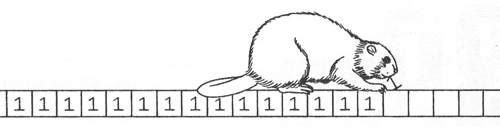
Busy beaver putting ones on a Turing Machine’s tape
Busy Beaver puts another one on the Turing Machine’s tape.
(image from a book “the new turing omnibus“)

The busy beaver problem is a fun theoretical computer science problem to know. Intuitively, the problem is to find the smallest program that outputs as many data as possible and eventually halts. More formally it goes like this — given an n-state Turing Machine with a two symbol alphabet {0, 1}, what is the maximum number of 1s that the machine may print on an initially blank tape (0-filled) before halting?

It turns out that this problem can’t be solved. For a small number of states it can be reasoned about, but it can’t be solved in general. Theorists call such problems non-computable.

Currently people have managed to solve it for n=1,2,3,4 (for Turing Machines with 1, 2, 3 and 4 states) by reasoning about and running all the possible Turing Machines, but for n ≥ 5 this task has currently been impossible. While most likely it will be solved for n=5, theorists doubt that it shall ever be computed for n=6.

Let’s denote the number of 1s that the busy beaver puts on a tape after halting as S(n) and call it the busy beaver function (this is the solution to the busy beaver problem). The busy beaver function is also interesting — it grows faster than any computable function. It grows like this:

  • S(1) = 1
  • S(2) = 4
  • S(3) = 6
  • S(4) = 13
  • S(5) ≥ 4098 (the exact result has not yet been found)
  • S(6) ≥ 4.6 · 101439 (the exact result shall never be known)

If we were to use one atom for each 1 that the busy beaver puts on the tape, at n=6 we would have filled the whole universe! That’s how fast the busy beaver function is growing.

I decided to play with the busy beaver myself to verify the known results for n ≤ 5. I implemented a Turing Machine in Python, which turned out to be too slow, so I reimplemented it in C++ (source code of both implementations below).

I also wrote a visualization tool in Perl that shows how the Turing Machine’s tape changes from the start to the finish (source code also below).

I used the following best known Turing Machines. Their tapes are initially filled with 0’s, their starting state is ” a ” and halting state is ” h “. The notation ” a0 -> b1l ” means “if we are in the state “a” and the current symbol on the tape is “0″ then put a “1″ in that cell, switch to state “b” and move to left “l”. This process repeats until the machine ends up in the halting state.

Turing Machine for 1-state Busy Beaver:

a0 -> h1r

Turing Machine for 2-state Busy Beaver:

a0 -> b1r    a1 -> b1l
b0 -> a1l    b1 -> h1r

Here is how the trace of tape changes look like for the 2-state busy beaver:

Two State Busy Beaver
Tape changes for 2 state busy beaver.

Turing Machine for 3-state Busy Beaver:

a0 -> b1r    a1 -> h1r
b0 -> c0r    b1 -> b1r
c0 -> c1l    c1 -> a1l

Two State Busy Beaver
Tape changes for 3 state busy beaver.

Turing Machine for 4-state Busy Beaver:

a0 -> b1r    a1 -> b1l
b0 -> a1l    b1 -> c0l
c0 -> h1r    c1 -> d1l
d0 -> d1r    d1 -> a0r

Two State Busy Beaver
Tape changes for 4 state busy beaver.

Turing Machine for 5-state Busy Beaver:

a0 -> b1l    a1 -> a1l
b0 -> c1r    b1 -> b1r
c0 -> a1l    c1 -> d1r
d0 -> a1l    d1 -> e1r
e0 -> h1r    e1 -> c0r

This image is huge (6146 x 14293 pixels, but only 110KB in size). Click for full size.


Two State Busy Beaver

Tape changes for 5 state busy beaver.

Turing Machine for 6 state Busy Beaver:

a0 -> b1r    a1 -> e0l
b0 -> c1l    b1 -> a0r
c0 -> d1l    c1 -> c0r
d0 -> e1l    d1 -> f0l
e0 -> a1l    e1 -> c1l
f0 -> e1l    f1 -> h1r

Here is my Python program to simulate all these Turing Machines. But as I said, it turned out to be too slow. For the 5 state Busy Beaver it took 5 minutes to generate the currently best known solution.

Download: busy_beaver.py (377)

#!/usr/bin/python
#
# Turing Machine simulator for Busy Beaver problem.
# Version 1.0
#

import sys

class Error(Exception):
    pass

class TuringMachine(object):
    def __init__(self, program, start, halt, init):
        self.program = program
        self.start = start
        self.halt = halt
        self.init = init
        self.tape = [self.init]
        self.pos = 0
        self.state = self.start
        self.set_tape_callback(None)
        self.tape_changed = 1
        self.movez = 0

    def run(self):
        tape_callback = self.get_tape_callback()
        while self.state != self.halt:
            if tape_callback:
                tape_callback(self.tape, self.tape_changed)

            lhs = self.get_lhs()
            rhs = self.get_rhs(lhs)

            new_state, new_symbol, move = rhs

            old_symbol = lhs[1]
            self.update_tape(old_symbol, new_symbol)
            self.update_state(new_state)
            self.move_head(move)

        if tape_callback:
            tape_callback(self.tape, self.tape_changed)

    def set_tape_callback(self, fn):
        self.tape_callback = fn

    def get_tape_callback(self):
        return self.tape_callback

    property(get_tape_callback, set_tape_callback)

    @property
    def moves(self):
        return self.movez

    def update_tape(self, old_symbol, new_symbol):
        if old_symbol != new_symbol:
            self.tape[self.pos] = new_symbol
            self.tape_changed += 1
        else:
            self.tape_changed = 0

    def update_state(self, state):
        self.state = state

    def get_lhs(self):
        under_cursor = self.tape[self.pos]
        lhs = self.state + under_cursor
        return lhs

    def get_rhs(self, lhs):
        if lhs not in self.program:
            raise Error('Could not find transition for state "%s".' % lhs)
        return self.program[lhs]

    def move_head(self, move):
        if move == 'l':
            self.pos -= 1
        elif move == 'r':
            self.pos += 1
        else:
            raise Error('Unknown move "%s". It can only be left or right.' % move)

        if self.pos < 0:
            self.tape.insert(0, self.init)
            self.pos = 0
        if self.pos >= len(self.tape):
            self.tape.append(self.init)

        self.movez += 1

beaver_programs = [
    { },

    {'a0': 'h1r' },

    {'a0': 'b1r', 'a1': 'b1l',
     'b0': 'a1l', 'b1': 'h1r'},

    {'a0': 'b1r', 'a1': 'h1r',
     'b0': 'c0r', 'b1': 'b1r',
     'c0': 'c1l', 'c1': 'a1l'},

    {'a0': 'b1r', 'a1': 'b1l',
     'b0': 'a1l', 'b1': 'c0l',
     'c0': 'h1r', 'c1': 'd1l',
     'd0': 'd1r', 'd1': 'a0r'},

    {'a0': 'b1l', 'a1': 'a1l',
     'b0': 'c1r', 'b1': 'b1r',
     'c0': 'a1l', 'c1': 'd1r',
     'd0': 'a1l', 'd1': 'e1r',
     'e0': 'h1r', 'e1': 'c0r'},

    {'a0': 'b1r', 'a1': 'e0l',
     'b0': 'c1l', 'b1': 'a0r',
     'c0': 'd1l', 'c1': 'c0r',
     'd0': 'e1l', 'd1': 'f0l',
     'e0': 'a1l', 'e1': 'c1l',
     'f0': 'e1l', 'f1': 'h1r'}
]

def busy_beaver(n):
    def tape_callback(tape, tape_changed):
        if tape_changed:
            print ''.join(tape)

    program = beaver_programs[n]

    print "Running Busy Beaver with %d states." % n
    tm = TuringMachine(program, 'a', 'h', '0')
    tm.set_tape_callback(tape_callback)
    tm.run()
    print "Busy beaver finished in %d steps." % tm.moves

def usage():
    print "Usage: %s [1|2|3|4|5|6]" % sys.argv[0]
    print "Runs Busy Beaver problem for 1 or 2 or 3 or 4 or 5 or 6 states."
    sys.exit(1)

if __name__ == "__main__":
    if len(sys.argv[1:]) < 1:
        usage()

    n = int(sys.argv[1])

    if n < 1 or n > 6:
        print "n must be between 1 and 6 inclusive"
        print
        usage()

    busy_beaver(n)

I rewrote the Turing Machine simulator in C++ and the speedup was huge. Now it took 14 seconds to execute the same Busy Beaver 5.

Download: busy_beaver.cpp (380)

/*
** Turing Machine simulator for Busy Beaver problem.
** Version 1.0
*/

#include <cstdlib>
#include <iostream>
#include <utility>
#include <vector>
#include <string>
#include <map>

using namespace std;

typedef vector<char> Tape;
typedef map<string, string> Program;

class TuringMachine {
private:
    Tape tape;
    Program program;
    char start, halt, init, state;
    bool tape_changed;
    int moves;
    int pos;
public:
    TuringMachine(Program program, char start, char halt, char init):
        tape(1, init), program(program), start(start), halt(halt),
        init(init), state(start), moves(0), tape_changed(1), pos(0)
    { }

    void run() {
        while (state != halt) {
            print_tape();
            string lhs = get_lhs();
            string rhs = get_rhs(lhs);

            char new_state = rhs[0];
            char new_symbol = rhs[1];
            char move = rhs[2];

            char old_symbol = lhs[1];
            update_tape(old_symbol, new_symbol);
            update_state(new_state);
            move_head(move);
        }
        print_tape();
    }

    int get_moves() {
        return moves;
    }

private:
    inline void print_tape() {
        if (tape_changed) {
            for (int i=0; i<tape.size(); i++)
                cout << tape[i];
            cout << endl;
        }
    }

    inline string get_lhs() {
        char sp[3] = {0};
        sp[0] = state;
        sp[1] = tape[pos];
        return string(sp);
    }

    inline string get_rhs(string &lhs) {
        return program[lhs];
    }

    inline void update_tape(char old_symbol, char new_symbol) {
        if (old_symbol != new_symbol) {
            tape[pos] = new_symbol;
            tape_changed++;
        }
        else {
            tape_changed = 0;
        }
    }

    inline void update_state(char new_state) {
        state = new_state;
    }

    inline void move_head(char move) {
        if (move == 'l')
            pos -= 1;
        else if (move == 'r')
            pos += 1;
        else
            throw string("unknown state");

        if (pos < 0) {
            tape.insert(tape.begin(), init);
            pos = 0;
        }
        if (pos >= tape.size()) {
            tape.push_back(init);
        }
        moves++;
    }

};

vector<Program> busy_beavers;

void init_bb6()
{
    Program bb6;
    bb6.insert(make_pair("a0", "b1r"));
    bb6.insert(make_pair("b0", "c1l"));
    bb6.insert(make_pair("c0", "d1l"));
    bb6.insert(make_pair("d0", "e1l"));
    bb6.insert(make_pair("e0", "a1l"));
    bb6.insert(make_pair("f0", "e1l"));

    bb6.insert(make_pair("a1", "e0l"));
    bb6.insert(make_pair("b1", "a0r"));
    bb6.insert(make_pair("c1", "c0r"));
    bb6.insert(make_pair("d1", "f0l"));
    bb6.insert(make_pair("e1", "c1l"));
    bb6.insert(make_pair("f1", "h1r"));

    busy_beavers.push_back(bb6);
}

void init_bb5()
{
    Program bb5;
    bb5.insert(make_pair("a0", "b1l"));
    bb5.insert(make_pair("b0", "c1r"));
    bb5.insert(make_pair("c0", "a1l"));
    bb5.insert(make_pair("d0", "a1l"));
    bb5.insert(make_pair("e0", "h1r"));

    bb5.insert(make_pair("a1", "a1l"));
    bb5.insert(make_pair("b1", "b1r"));
    bb5.insert(make_pair("c1", "d1r"));
    bb5.insert(make_pair("d1", "e1r"));
    bb5.insert(make_pair("e1", "c0r"));

    busy_beavers.push_back(bb5);
}

void init_bb4()
{
    Program bb4;
    bb4.insert(make_pair("a0", "b1r"));
    bb4.insert(make_pair("b0", "a1l"));
    bb4.insert(make_pair("c0", "h1r"));
    bb4.insert(make_pair("d0", "d1r"));

    bb4.insert(make_pair("a1", "b1l"));
    bb4.insert(make_pair("b1", "c0l"));
    bb4.insert(make_pair("c1", "d1l"));
    bb4.insert(make_pair("d1", "a0r"));

    busy_beavers.push_back(bb4);

}

void init_bb3()
{
    Program bb3;
    bb3.insert(make_pair("a0", "b1r"));
    bb3.insert(make_pair("b0", "c0r"));
    bb3.insert(make_pair("c0", "c1l"));

    bb3.insert(make_pair("a1", "h1r"));
    bb3.insert(make_pair("b1", "b1r"));
    bb3.insert(make_pair("c1", "a1l"));

    busy_beavers.push_back(bb3);
}

void init_bb2()
{
    Program bb2;
    bb2.insert(make_pair("a0", "b1r"));
    bb2.insert(make_pair("b0", "a1l"));

    bb2.insert(make_pair("a1", "b1l"));
    bb2.insert(make_pair("b1", "h1r"));

    busy_beavers.push_back(bb2);
}

void init_bb1()
{
    Program bb1;
    bb1.insert(make_pair("a0", "h1r"));

    busy_beavers.push_back(bb1);
}

void init_busy_beavers()
{
    busy_beavers.push_back(Program());
    init_bb1();
    init_bb2();
    init_bb3();
    init_bb4();
    init_bb5();
    init_bb6();
}

void busy_beaver(int n)
{
    cout << "Running Busy Beaver with " << n << " states." << endl;
    TuringMachine tm(busy_beavers[n], 'a', 'h', '0');
    tm.run();
    cout << "Busy Beaver finished in " << tm.get_moves() << " steps." << endl;
}

void usage(const char *prog)
{
    cout << "Usage: " << prog << " [1|2|3|4|5|6]\n";
    cout << "Runs Busy Beaver problem for 1 or 2 or 3 or 4 or 5 or 6 states." << endl;
    exit(1);
}

int main(int argc, char **argv)
{
    if (argc < 2) {
        usage(argv[0]);
    }

    int n = atoi(argv[1]);
    if (n < 1 || n > 6) {
        cout << "n must be between 1 and 6 inclusive!\n";
        cout << "\n";
        usage(argv[0]);
    }

    init_busy_beavers();
    busy_beaver(n);
}

And I also wrote a Perl program that uses the GD library to draw the tape changes on Turing Machines.

Download: draw_turing_machine.perl (322)

#!/usr/bin/perl
#
# Given output from busy_beaver.py or busy_beaver.cpp,
# draws the turing machine tape changes.
#

use warnings;
use strict;
use GD;

$|++;

my $input_file = shift or die 'Usage: $0 <file with TM state transitions>';
my $cell_size = shift || 4;
my $im_file = "$input_file.png";

sub line_count {
    my $count = 0;
    open my $fh, '<', shift or die $!;
    $count += tr/\n/\n/ while sysread($fh, $_, 2**20);
    return $count;
}

sub get_last_line {
    my $file = shift;
    my $last_line = `tail -1 $file`;
    chomp $last_line;
    return $last_line;
}

my $nr_lines = line_count $input_file;
my $last_line = get_last_line $input_file;
my $last_width = length($last_line);

my ($width, $height) = ($cell_size*$last_width, $cell_size*$nr_lines);

my $im = GD::Image->new($width, $height);
my $white = $im->colorAllocate(255,255,255);
my $dark = $im->colorAllocate(40, 40, 40);

my ($x, $y) = (0, $height-$cell_size);

print "Starting to draw the image. Total states: $nr_lines.\n";
print "It will be $width x $height pizels in size.\n";

my $prev_line;
my ($pad_left, $pad_right) = (0, 0);

sub pad {
    my ($line, $left, $right) = @_;
    return '0'x$left . $line . '0'x$right;
}

open my $fh, "-|", "/usr/bin/tac $input_file" or die $!;
while (<$fh>) {
    chomp;
    print "." if $. % 10 == 0;
    print "($.)" if $. % 500 == 0;

    $prev_line = $_ unless defined $prev_line;

    my $new_line;
    if (length $_ != length $prev_line) {
        if ($prev_line =~ /0$/) {
            $pad_right++;
        }
        elsif ($prev_line =~ /^0/) {
            $pad_left++;
        }
        else {
            die "unexpected data at $. in file $input_file";
        }
    }
    $new_line = pad($_, $pad_left, $pad_right);
    $prev_line = $_;

    my @cells = split //, $new_line;
    for my $cell (@cells) {
        $im->filledRectangle($x, $y, $x + $cell_size, $y + $cell_size,
                $cell ? $dark : $white);
        $x += $cell_size;
    }
    $y -= $cell_size;
    $x = 0;

}

print "\n";

{
    open my $fh, ">", $im_file or die $!;
    print $fh $im->png;
    close $fh;
}

print "Done. Image saved to $im_file.\n";

You can play with these programs yourself. Here is how. Run “busy_beaver.py <n>” with n=1,2,3,4,5,6. This will run the n-state busy beaver Turing Machine. The output will be the tape changes. Then use “draw_turing_machine.pl” to visualize the tape changes.

For example:

$ busy_beaver.py 4 > bb4
$ draw_turing_machine.pl bb4

There are variations of this problem. For example, the busiest beaver with 3 and more symbols. See “The Busy Beaver Competition” for these. The historical development is also interesting — see The Busy Beaver Historical Survey for more info.

I first learned about the Busy Beaver problem from a book called “The New Turing Omnibus.” It contains 66 different essays on various computer science subjects such as algorithms, turing machines, grammars, computability, randomness, and other fun topics. These essays are written in an accessible style that even a high school student can understand them. Each essay doesn’t take more than 10 minutes to read. I recommend this book. Get it here:

Comments (19) Comments | Email Post Email 'The Busy Beaver Problem' to a friend | Print Post Print 'The Busy Beaver Problem' | Permalink Permalink to 'The Busy Beaver Problem' | Trackback Trackback to 'The Busy Beaver Problem'
(Popularity: 10%) 41,099 Views

Did you like this page? Subscribe to my posts!